Author: Brody Kilpatrick | Created: June 11, 2019
Quickly remove a specific email from multiple mailboxes.
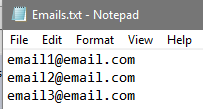
Create a list of emails and store in a text file
Open the Exchange Command Shell
Execute the below commands while changing the required areas
$Results = @()
$Emails = Get-Content -Path C:\temp\Emails.txt
foreach ($Email in $Emails)
 {
  $Results += Search-Mailbox $Email -SearchDumpster -SearchQuery '(from:Someone@BadEmail.com)' -DeleteContent
 }
 $results | Select -Property Identity, ResultItemsCount, ResultItemsSize