Author: Brody Kilpatrick | Created: March 8, 2021
I created a Powershell command that will resolve SCOM Alerts in a “New” state (State 0) based on a list of alert names that you feed the script from a text file. I will put on Github soon, until there, here it is.
<#
.Synopsis
   Auto-resolve alerts generated by rules in SCOM from a text list.
.DESCRIPTION
   Author: Brody Kilpatrick
   Auto-resolve alerts generated by rules in SCOM from a text list.
   If the alert is generated by a monitor instead of a rule, then the state of the parent monitor will also be reset.
   If you set the $VerbosePreference='Continue' you will get some extra details.
   A list should be a txt file that looks like this:

    Service Failed to Start
    Event Log Error 23
    The Process is using too much CPU

.EXAMPLE
   If you want to resolve the alert list:
   Resolve-SCOMAlertlist -AlertList 'C:\temp\alertlist.txt' -Resolve $true
.EXAMPLE
   If you want to view the alert list in a variable but not resolve it:
   $Results = Resolve-SCOMAlertlist -AlertList 'C:\temp\alertlist.txt' -Resolve $false
#>
function Resolve-SCOMAlertlist
{
    [CmdletBinding()]
    [Alias()]
    [OutputType([int])]
    Param
    (
        # List of alerts by alert display name to resolve.
        [Parameter(Mandatory=$true,
                   ValueFromPipelineByPropertyName=$false,
                   Position=0)]
        $Alertlist='D:\Software\scripts\Resolve-SCOMAlerts\Alertlist.txt',

        # Resolve this list of alerts. If set to false (default) then it will only list the alerts it would have resolved and will take no action.
        [Parameter(Mandatory=$true,
                   ValueFromPipelineByPropertyName=$false,
                   Position=1)]
        [boolean]
        $Resolve
    )
    $error.Clear()

#Setup
#Get Alert List File
Try {
$AlertlistContent = @()
$AlertlistContent = Get-Content $Alertlist -ErrorAction Stop
}
    Catch {
     Write-Error "Could not get the Alert List. Please check the patch. Additional Error Information Is Below."
     Return $null
    }

if ($AlertlistContent -ne $null) {
 Write-Verbose "List Of Alerts Retrieved from file:"
 foreach ($Alertitem in $AlertlistContent){
  write-Verbose $Alertitem
 }
}
else {
 Write-Error "Did not find any information in the file."
 Return $null
}

#Connect to SCOM Management Shell
Try {
 Write-Verbose "Attempting to load OperationsManager Module"
 Import-Module OperationsManager -ErrorAction Stop -Verbose:$false
}
    Catch {
    Write-Error "Could not Load OperationsManager Module"
    $error
     Return $null
    }

#Find any alerts from the list
Write-Verbose "Find any alerts from the list"
$AlertsToResolveArray = @()
foreach ($Alertitem in $AlertlistContent){
 Write-Verbose "Checking for alerts from $Alertitem"
 $FoundAlertsArray = @()
 $FoundAlertsArray = Get-SCOMAlert -Name $Alertitem -ResolutionState 0
 if ($FoundAlertsArray -ne $null){
  Write-Verbose "Found ($FoundAlertsArray.Count) Alerts"
  $AlertsToResolveArray += $FoundAlertsArray
 }
 else {
  Write-Verbose "Found 0 Alerts"
 }
}

#Action
#Resolve the Alerts
if ($AlertsToResolveArray -ne $null){
 if ($Resolve -eq $true){
  Write-Verbose "Resolving Alerts"

  #Check to see if any of the alerts are generated by monitors. If they are, we will need to reset their state as well.
  Write-Verbose "Check to see if any of the alerts are generated by monitors. If they are, reset their state."
  foreach ($UniqueAlert in $AlertsToResolveArray){
   write-verbose ($UniqueAlert.Name)
   if ( ($UniqueAlert.IsMonitorAlert) -eq $true  ){
    Write-Verbose "Alert is based on Monitor, resetting state."
    $Monitor = Get-SCOMMonitor -Id $UniqueAlert.MonitoringRuleId
    (Get-SCOMClassInstance -ID $UniqueAlert.MonitoringObjectId).ResetMonitoringState($Monitor) | Out-Null
   }
   else {
    Write-Verbose "Alert is based on Rule, resolving."
    $UniqueAlert | Resolve-SCOMAlert -Comment "Auto-Resolved by Cleanup Script"
   }
  }
  return $AlertsToResolveArray
 }
 else {
  Write-Verbose "Resolve is set to false, simply listing alerts."
  return $AlertsToResolveArray
 }
}
else {
 Write-Verbose "No Alerts Found"
 return $null
}

}
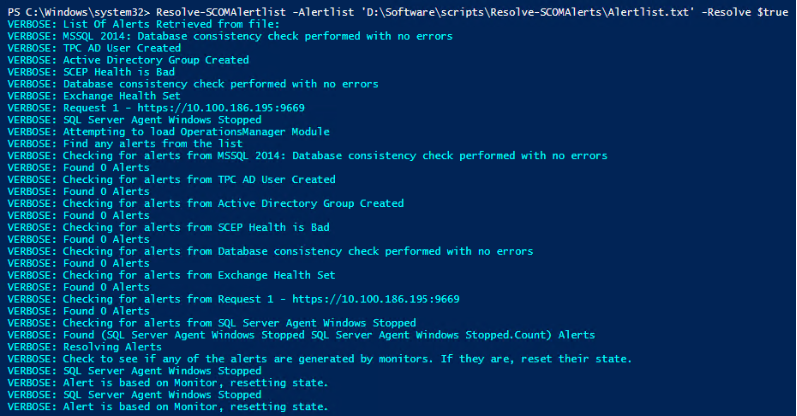
Example:
$a = Resolve-SCOMAlertlist -Alertlist ‘D:\Software\scripts\Resolve-SCOMAlerts\Alertlist.txt’ -Resolve $true
$a
Text File Example:
MSSQL 2014: Database consistency check performed with no errors
TPC AD User Created
Active Directory Group Created
SCEP Health is Bad
Database consistency check performed with no errors
Exchange Health Set
Request 1 - https://10.100.186.195:9669
SQL Server Agent Windows Stopped
Output Example: