Author: Brody Kilpatrick | Created: May 24, 2019
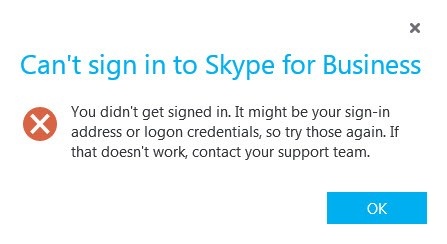
Recently, I spent some time troubleshooting a sign-in issue for one of our Skype for Business users. The account was a re-hire account, therefore it had previously existed and then had been deleted from Skype for Business. Once the person was rehired, the account was re-created in Skype, but the account would not log in.
Upon inspection of the client trace logs I found this:
VerifyOnEnableEvent result return ONENABLE_FAIL_AUTH_FAIL status=0x80ef0191 diag code=0xfa4 authWebserviceBaseUrl=https://sfbweb-na.domain.pvt:443/CertProv/CertProvisioningService.svc ACTION: AUTH FAIL
Based on that information, I tried:
After further digging, I found a blog post with instructions on removing the user entry completely from the database, and it turned out to be the key.
From what I understand, sometimes when a user is deleted from Skype, the entry isn’t always removed from the local RTC database on each of the Skype Front End servers. After finding and removing the user, I was able to log the account in with no issues.
Removal of the Skype account is quite easy.
Use RTC
GO
Select * from [rtc].[dbo].[Resource] WHERE [UserAtHost] like '%SIPPREFIX%'
If you find an entry, you can run the following command to delete it.
execute dbo.RtcDeleteResource 'john.doe@MyDomain.com'
REMEMBER, you need to repeat for every front-end local RTC database.
Once you have followed the steps above, you can then add the account back into Skype and then attempt to login.
Now that we understand what we are doing, let’s take it a step further. Say, for instance, you have a large environment with many front-end servers and you don’t want to connect SQL over and over to execute the command. We can use PowerShell to gather all of the front-end servers and execute the command on each.
First, we need to get all the front-end servers.
$SfbComputers = Get-CsPool | ? {$_.Services -like "*UserServer*"} | select -ExpandProperty computers
Once we have a list a computers to query, we can connect to each one via SQL and execute the delete command. This is much easier to do with a function that we can call over and over.
function Invoke-MSSQL
{
	param (
		[string]$Server = ".\SQLEXPRESS",
		[string]$Database = "MasterData",
		[string]$CMDType = "",
		[string]$sqlCommand = $(throw "Please specify a query.")
	)

	#Timeout parameters
	$QueryTimeout = 120
	$ConnectionTimeout = 30

	$ConnectionString = "Server={0};Database={1};Integrated Security=True;Connect Timeout={2}" -f $Server, $Database, $ConnectionTimeout
	$connection = new-object system.data.SqlClient.SQLConnection($connectionString)
	$command = new-object system.data.sqlclient.sqlcommand
	$command.CommandText = $sqlCommand
	$command.Connection = $connection
	if ($CMDType -eq "SP")
	{
		$command.CommandType = [System.Data.CommandType]::StoredProcedure
		$connection.Open()
		$command.ExecuteNonQuery()
		$connection.Close()
	}
	elseif ($CMDType -eq "DEL")
	{
		$connection.Open()
		$command.ExecuteNonQuery()
		$connection.Close()
	}
	else
	{
		$connection.Open()
		$adapter = New-Object System.Data.sqlclient.sqlDataAdapter $command
		$dataset = New-Object System.Data.DataSet
		[VOID]$adapter.Fill($dataSet)
		$connection.Close()
		$dataSet.Tables
	}
}
We simply call the function to loop through each server.
foreach ($sfbComputer in $sfbComputers)
 {
  $sfbComputer = "$sfbComputer\RTCLOCAL"
  $results = Invoke-MSSQL -Server $sfbComputer -database RTC -SQLCommand "RtcDeleteResource 'john.doe@MyDomain.com'" -CMDType "SP"
 }
function Invoke-MSSQL
{
	param (
		[string]$Server = ".\SQLEXPRESS",
		[string]$Database = "MasterData",
		[string]$CMDType = "",
		[string]$sqlCommand = $(throw "Please specify a query.")
	)

	#Timeout parameters
	$QueryTimeout = 120
	$ConnectionTimeout = 30

	$ConnectionString = "Server={0};Database={1};Integrated Security=True;Connect Timeout={2}" -f $Server, $Database, $ConnectionTimeout
	$connection = new-object system.data.SqlClient.SQLConnection($connectionString)
	$command = new-object system.data.sqlclient.sqlcommand
	$command.CommandText = $sqlCommand
	$command.Connection = $connection
	if ($CMDType -eq "SP")
	{
		$command.CommandType = [System.Data.CommandType]::StoredProcedure
		$connection.Open()
		$command.ExecuteNonQuery()
		$connection.Close()
	}
	elseif ($CMDType -eq "DEL")
	{
		$connection.Open()
		$command.ExecuteNonQuery()
		$connection.Close()
	}
	else
	{
		$connection.Open()
		$adapter = New-Object System.Data.sqlclient.sqlDataAdapter $command
		$dataset = New-Object System.Data.DataSet
		[VOID]$adapter.Fill($dataSet)
		$connection.Close()
		$dataSet.Tables
	}
}

$SfbComputers = Get-CsPool | ? {$_.Services -like "*UserServer*"} | select -ExpandProperty computers

foreach ($sfbComputer in $sfbComputers)
 {
  $sfbComputer = "$sfbComputer\RTCLOCAL"
  $results = Invoke-MSSQL -Server $sfbComputer -database RTC -SQLCommand "RtcDeleteResource 'john.doe@MyDomain.com'" -CMDType "SP"
 }